
Every low-code pitch sounds the same until you try to leave.
The demo is fast. The first app ships in an afternoon. Then a year passes, the tool no longer fits, and you go looking for the exit — only to discover there isn’t one. Your data lives inside the vendor’s runtime. You can see your records through their screens, maybe export a CSV or two, but the structure — the relationships, the types, the logic that makes the data mean something — stays behind. You own the rows. You don’t own the database.
That gap is what vendor lock-in actually is. Not a contract clause. A technical fact about where your data lives and what you can do with it without the vendor’s permission.
dForge is built on the opposite assumption: you should be able to walk away with everything that matters, at any time, without asking.
What real lock-in looks like
It helps to be precise, because “no lock-in” gets claimed by everyone and means almost nothing.
You’re locked in when:
- Your data only exists inside the platform’s proprietary store, and the only way out is a lossy export — flat CSVs that drop the relationships, the field types, the constraints.
- You own the records but not the schema, so even with a dump in hand, nothing you have can run against it without the vendor’s engine.
- Self-hosting is unavailable, or available only on the plan above yours, so your business-critical data sits on infrastructure you don’t control.
In every one of those cases the cost of leaving isn’t a fee. It’s a rebuild. And a rebuild you can’t afford is a cage, however nice the bars.
With dForge, your data is yours — database and files
Here is the whole difference in one sentence: in dForge, the things your business runs on — its data and its files — live in standard, open places that belong to you, not inside a vendor’s black box.
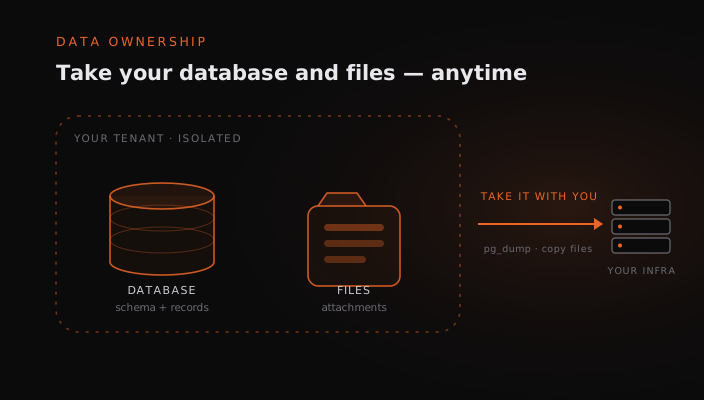
Not a metaphor. Your business data lives in ordinary PostgreSQL tables, in real schemas (crm, hr, fin, and so on), with real columns, real foreign keys, and real constraints — one database per tenant, completely isolated, no schema shared with anyone else. Your uploaded files — receipts, contracts, attachments — sit alongside it in a plain per-tenant directory (or your own S3 bucket), referenced from the database by simple relative paths. Two standard stores, both yours. That’s what makes ownership concrete rather than rhetorical:
- Clean backup and restore. A tenant is one database plus one file directory. A
pg_dumpand a copy of the folder give you a complete, faithful copy — structure, data, and documents, not a flattened extract. - Move it anywhere. Migrating to another server means moving one database and one directory (or pointing at the S3 bucket you already control). No proprietary bundle to unpack, no re-import ritual.
- Inspect it directly. Your developers can connect with any Postgres client and read the data as it actually is; open the file directory and there are your real documents. No opaque app format stands between you and your own information.
This isn’t a feature we bolted on for a pricing tier. It falls out of how the platform is built, and it applies on every plan, including self-hosted.
Two ways out — and you can take either
Because the data is a normal database, leaving isn’t a single dramatic event. You have options, and they’re both real.
1. Keep the data, leave the runtime. Maybe dForge got you from spreadsheets to a working operational system in weeks, and now you’ve grown to the point where you want a bespoke application your own engineers maintain. Fine. Point them at the same PostgreSQL database. What they inherit is a clean, typed, relational model — not something reverse-engineered out of a black box. They build on top of it in plain SQL, or any framework they like, on their own schedule.
2. Migrate off entirely. If you’re moving to a different system altogether, there’s nothing to “export,” because it was never trapped. It’s already a database and a directory of files. Back them up, move them, and go.
Either way, the leverage stays with you. That changes the relationship — including, frankly, every renewal conversation.
Where the line actually is
Now the honest part, because a claim like this is only worth anything if we draw the boundary clearly.
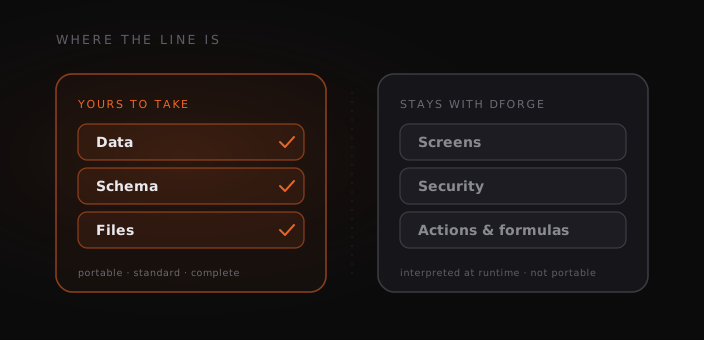
What’s yours to take: the data, the schema, and the files. Tables, columns, relationships, every record — plus the documents your team uploaded. All portable, standard, complete.
What isn’t portable: the dForge runtime. dForge is metadata-driven. The screens, the row- and column-level security, the actions and formulas — those are interpreted at runtime by the dForge engine from metadata. If you leave, you leave that behind. You don’t get the running application as a thing you can host elsewhere and keep editing; you get the data it was running on.
We’d rather say that plainly than let you find out later. The promise isn’t “dForge has no lock-in of any kind” — that would be a lie, and you’d catch it. The promise is narrower and true: your data and its structure are never held hostage. The thing most platforms quietly keep from you is the exact thing dForge hands back.
Why this matters even if you never leave
Most teams who own their data never exercise the exit. The value isn’t in leaving. It’s in everything that ownership makes possible while you stay:
- Your developers can work directly against the database — reporting, integrations, one-off analysis — without waiting on an API to expose what they need.
- Compliance and audit get simpler when the data is in a standard database you can isolate geographically and back up on your own terms.
- Platform risk drops to near zero. If priorities shift or a vendor changes course, your operation doesn’t depend on their runtime staying exactly as it is forever. The data underneath is yours regardless.
Owning your data isn’t an escape hatch you hope never to use. It’s the thing that lets you commit to a platform without betting the business on it.
If that’s the trade you want — move fast now, keep your options open forever — that’s the whole idea behind dForge. It’s closely related to a distinction we’ve written about before, configuring a system versus owning your model, and it runs through how the whole platform is built.
Frequently asked questions
Can I export my data from dForge?
Yes — completely. Your business data lives in a standard PostgreSQL database (one per tenant), and your uploaded files live in a plain per-tenant directory or your own S3 bucket. A pg_dump plus a copy of that directory is a full, faithful export — schema, relationships, types, and documents. It isn’t a flattened CSV; it’s the real database and the real files.
What happens to my app if I stop using dForge? You keep the data and its full structure. The dForge runtime — the generated screens, security, and logic — is interpreted from metadata and doesn’t come with you, but the PostgreSQL database does. Your developers can build a new application on top of the same data, or you can migrate it elsewhere.
Is my dForge data stored in a proprietary format? No. It’s ordinary PostgreSQL tables with real columns and foreign keys. Any Postgres client can read it directly.
Can my own developers work with the database? Yes. Because it’s a standard PostgreSQL database, your team can connect with any Postgres tooling to run reports, build integrations, or extend the data model — without going through the platform.
Can I self-host dForge? Yes. Each tenant is an isolated database, which makes self-hosting and clean per-client backup and restore straightforward. Your business-critical data can sit on infrastructure you control.
Is the running application portable too, not just the data? No — and we’d rather be upfront about it. dForge is metadata-driven, so the live application behaviour is produced by the dForge engine at runtime and isn’t something you can host independently. What’s portable is the data and its schema, which is the part most platforms keep from you.