

Almost every business application has the same quiet bottleneck. The data is all in there — orders, tickets, hours, inventory — and someone asks a perfectly reasonable question: “Can I see this broken down by region, for last quarter, with the overdue ones flagged?” And the answer, in most systems, is: file a request, and wait.
So reporting becomes a queue. Either you wait on a developer to write the query and build the screen, or someone bolts a BI tool onto the database to get around the wait — and, as we’ll see, that “solution” tends to create a more serious problem than the one it solved.
dForge takes a different position: the people who have the questions should be able to answer them themselves, and they should never, by doing so, be able to see a single row they weren’t already allowed to see. This post is about how those two things fit together — because individually they’re easy, and together they’re the whole game.
Why reporting is usually either slow or unsafe
The traditional options each fail in their own way.
Developer-built reports are accurate and governed, but they’re a queue. Every new question is a ticket. The person who understands what they’re looking for is the least able to get it, and by the time the report lands, the question has often moved on. Reporting at the speed of a sprint is not reporting at the speed of a business.
Bolt-on BI tools are fast, but they usually solve speed by going around your application. They connect straight to the database with a single service account — one that can read everything. The careful row-level and column-level permissions you built into your app? The BI layer never sees them. Now your salary column, your other regions’ deals, your restricted customers are all one drag-and-drop away for anyone with access to the dashboard tool. The org traded a slow queue for a silent data-exposure surface, and usually nobody notices until an audit — or an incident.
The real requirement is both at once: self-service speed with the application’s own security intact. That’s only achievable if reporting runs through the same model and the same permission stack as the rest of the app, rather than beside it.
Two tools, one engine
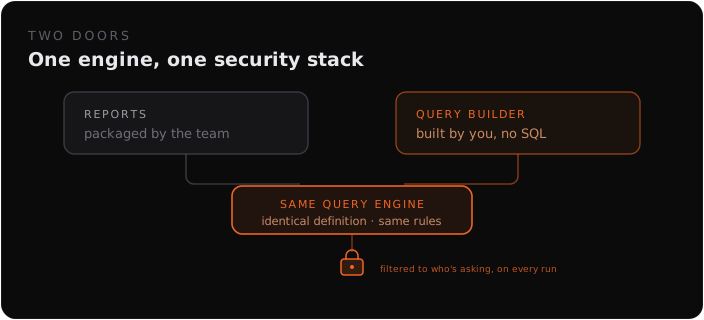
dForge splits reporting into two jobs that share a single foundation.
- Reports are formal and packaged with a module. A module developer builds them for recurring needs — the monthly close, the parameterized export, the dashboard everyone relies on.
- The Visual Query Builder is for everyone else, every day. Users create, save, and re-run their own queries — no ticket, no SQL.
The key detail: both produce the same query definition and run on the same engine. A question a user explores ad-hoc isn’t a second-class artifact — it’s the exact same structure a formal report is made of. So a useful one-off can be promoted into a packaged report later with no rewrite. Self-service and governed reporting aren’t two systems bolted together; they’re two doors into one room.
What “build it yourself” actually looks like
The query builder is designed for the person who knows the question, not the schema.
- Pick what you’re looking at, then pull in columns by walking the relationship tree. The builder follows references and child sets for you, so you can pull a customer’s region and an invoice’s line items into the same view without ever thinking about a JOIN.
- Filter and sort to the slice you care about.
- Flip between flat and grouped. Flat lists the individual records; grouped aggregates them — sum, count, average, min, max — so the same starting point answers both “show me the orders” and “show me totals by month.”
- Save it. Your saved queries are yours — personal, scoped to the module — and you can re-run them with one click.
From there, the same query becomes a visualization. Drop it on a dashboard as a KPI tile, a bar / line / pie / funnel / heatmap chart, or a pivot. Dashboards are per-user: a module can ship a default, but the moment you edit it you get your own private copy, arranged the way you read the data. Change your mind about how to see something and you switch the visualization — you don’t file a request for a new screen. (This is the reporting half of the same story we told about generated UI vs hand-built screens: when the artifact is a definition rather than code, the user can reshape it.)
Reports that drill into each other
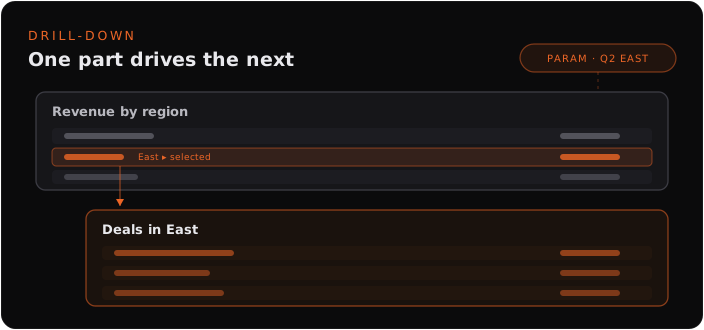
The questions worth asking are rarely flat. “Show me revenue by region” is immediately followed by “okay, which deals make up the East number?” That’s drill-down, and it’s a first-class capability rather than a bolt-on.
A report is a collection of datasets rendered together, and a dataset can declare a parent — a master-detail relationship. One part summarizes; selecting a row drives the part beneath it to show the detail behind that number. Datasets share parameters, so a single date range or region filter at the top flows down through every part of the report at once, and they stay in sync. The result is a report where one part genuinely depends on another, wired through configuration rather than through a developer hand-coding the link between two screens.
And because parameters can carry formula defaults evaluated at run time, a report can open to “the current month” or “this quarter” automatically, every time, without anyone touching it.
The part that makes it safe: security runs underneath, always
Here is the line that makes self-service reporting defensible instead of dangerous:
A report can never expose more data than the user could see by querying the underlying entities directly.
That’s not a policy you have to remember to apply — it’s how execution works. Every report and every ad-hoc query runs through the same security stack as the rest of the application:
- The user must have execute rights on the report itself.
- Each dataset runs with the active folder’s row filter and the user’s row-level security rules applied.
- Column-level security from the active view is enforced, so restricted columns simply aren’t in the result.
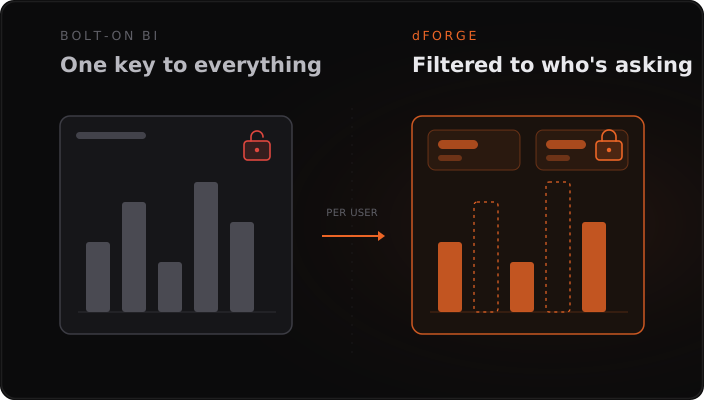
The same query, run by two different people, returns two different result sets — each correct for who’s asking. A regional manager’s “revenue by region” quietly contains only their region. A user without rights to the salary column gets a report with no salary column, not a report they were trusted not to scroll. The permissions aren’t re-implemented for reporting; reporting inherits them, because it goes through the model instead of around it.
This is the precise failure of the bolt-on BI approach, inverted. There’s no all-seeing service account, because there’s no separate connection — the report is just another thing the user is allowed (or not) to ask the system, evaluated by the same rules on every execution.
The honest trade-offs
Self-service reporting on top of the model is the right default for operational analytics, but it isn’t a replacement for everything, and pretending otherwise would be the kind of overclaim this post is arguing against.
What you give up:
- It’s not a full BI suite. Dedicated tools like Power BI, Looker, or Tableau offer richer chart libraries, advanced statistical visuals, and modeling features dForge’s reporting doesn’t try to match.
- Heavy analytics still wants a warehouse. Cross-system blending, billion-row scans, and data-science workflows belong in a warehouse and a BI layer, not in your operational platform.
- Live, governed exports to BI need a deliberate path. Because dForge won’t hand a tool an all-access connection, feeding an external BI stack is an intentional, permissioned step — by design, not by accident.
- The deepest performance cases still use code. A report can mix in a developer-written stored procedure for a performance-critical aggregation; the metadata path covers most needs, not all.
What you get in return:
- Answers in minutes, by the person with the question — no reporting queue.
- One engine for ad-hoc and packaged reporting, so good questions graduate into shared reports without a rewrite.
- Drill-down and shared parameters as configuration, not custom screens.
- Per-user dashboards and visualizations that adapt to how each person works.
- Security that can’t be left off — every result is filtered to what the viewer is already allowed to see.
The trade points in a clear direction: for the analytics a business runs on — the operational questions asked daily, by the people doing the work, against live data that must stay governed — self-service reporting through the model beats both the developer queue and the bolt-on BI tool. For warehouse-scale data science, reach for the warehouse.
The point
Most organizations think they’re choosing between fast reporting and safe reporting. That choice is an artifact of building reporting beside the application instead of inside it. Put it through the same model and the same permission stack, and the trade-off dissolves: users get to answer their own questions, and the system guarantees they only ever see what was theirs to see.
If your current setup makes you pick between a reporting backlog and a service account that can read everything, that’s worth a conversation — get in touch and we’ll walk through how your hardest report would actually behave.