
What it does
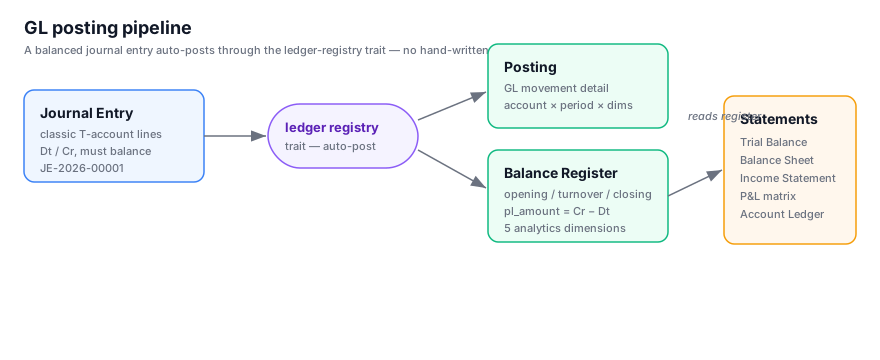
gl is a generic, standards-aligned General Ledger. You define a chart of accounts mapped to
statement categories, post balanced journal entries, and the platform's ledger-registry trait
automatically maintains a movement journal and a period balance register — no hand-written balance
arithmetic, triggers, or stored procedures. Financial statements read straight off the register.
It is a regular installable module: use it as-is, fork it, or replace it with your own ledger.
Nothing in the platform hard-codes gl.
Highlights
- Hierarchical chart of accounts — self-referencing account tree, mapped to
statement(Balance Sheet / Income Statement),section(Asset/Liability/Equity/Income/Expense) andnormal_balance. Control accounts (AR/AP/Inventory) flag their owning module. - Classic double-entry journals — T-account lines with debit/credit, enforced balanced before
posting, auto-numbered (
JE-2026-00001, yearly reset). - Automatic posting — a balanced entry posts to the declared accounting register
gl.ledger: dated rows inposting, and debit/credit turnover per account and month inledger_totals, which the platform maintains. An opening balance is the turnover before the period — there is nothing to carry forward, and balances at go-live arrive as an ordinary opening entry. - Period & year close — closing a period freezes it; year-end generates a balanced draft closing entry that lands the net result in Retained Earnings.
- VAT register — a second register on each entry tracks VAT by tax period independently of the accounting period, so closing the tax period freezes only VAT fields.
- Financial statements — Trial Balance, Balance Sheet, Income Statement, Account Ledger, plus the Income Statement matrix.
The Income Statement matrix
The headline report. Accounts × periods, with the net per cell computed as credit − debit, so
income accounts read positive and expense accounts negative. A plain signed-sum rollup turns the
account tree into subtotals (Gross Profit, Operating Expenses) and the grand total into Net Income
— with no special sign logic anywhere in the engine.
On top of the figures, computed rows add the ratios a real income statement needs — Gross Margin %, OpEx % of Revenue — each defined as a formula over other rows and evaluated per period (read-only).
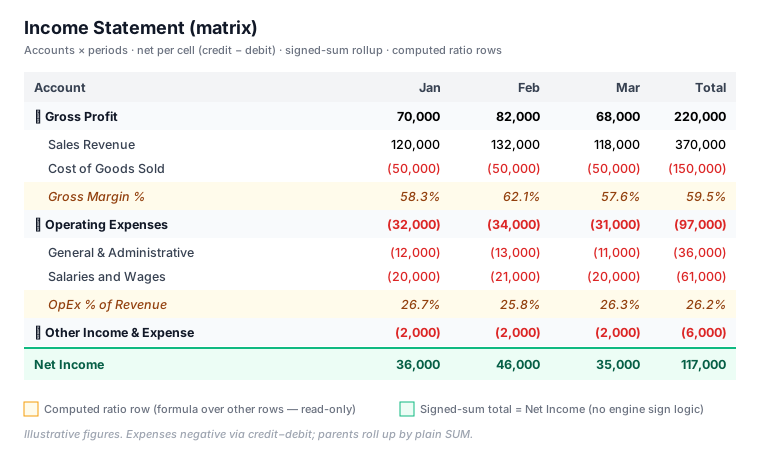
Features: tree subtotals · accounting-style negatives (parentheses + red) · hide-empty periods · From/To period range · drill-through from any cell to its source movements · computed ratio rows.
A computed row is pure view config —
{ "label": "Gross Margin %", "refs": { "gp": "…", "rev": "…" }, "formula": "[gp] / [rev] * 100" }. See docs/ui/matrix-computed-rows.md.
Data model
| Entity | Purpose | Key fields |
|---|---|---|
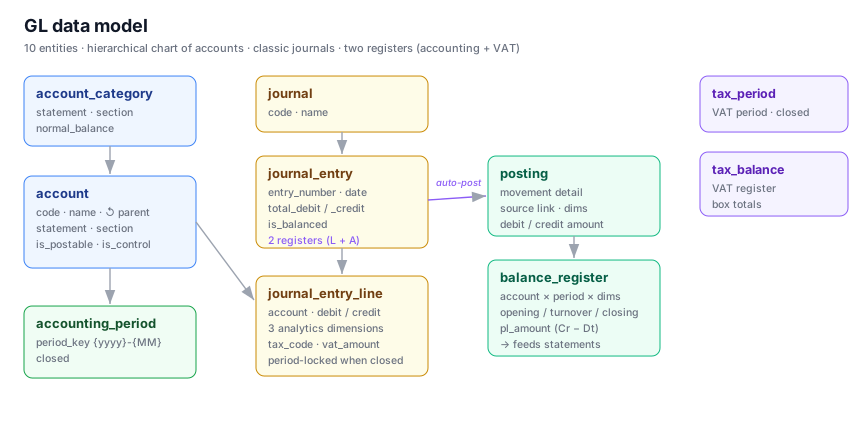
| account_category | Statement-mapping layer for accounts | statement, section, normal_balance |
| account | Hierarchical chart of accounts | account_code, account_name, parent, statement, section, is_postable, is_control |
| accounting_period | Monthly periods ({yyyy}-{MM}) |
period_key, closed |
| journal | Logical journal groupings | code, name |
| journal_entry | Balanced entry header (auto-numbered) | entry_number, entry_date, total_debit/credit, is_balanced |
| journal_entry_line | T-account lines | account, debit_amount, credit_amount, tax fields |
| posting | Journal of the gl.ledger register |
source, account, posted_on, period, debit/credit |
| ledger_totals | Monthly turnover cache of gl.ledger (platform-maintained) |
account × period, debit/credit, pl_amount |
| tax_period | VAT periods | period, closed |
| tax_balance | VAT register | box totals |
Views & reports
- Master data: Accounts, Account Categories, Journals, Periods
- Ledger: Journal Entries (with lines), Postings, Balance Register
- Reports: Trial Balance · Balance Sheet · Income Statement · Account Ledger · Income Statement Matrix · Income Statement Pivot
Actions
- Close Period — carries closing balances to the next period.
- Close Year — generates a balanced draft year-end closing entry into Retained Earnings.