
What it does
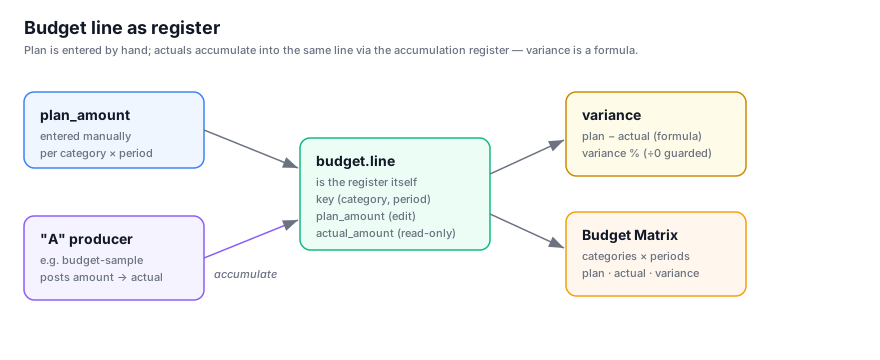
budget is a self-contained company budgeting module. You define a hierarchical tree of cost and
revenue categories, seed budgeting periods, and enter a planned amount per (category, period). Actuals
are not typed in — each budget line is itself an accumulation register, so posted movements
accumulate straight into its read-only actual_amount. Variance and variance % fall out as formulas,
and the Budget Matrix view reads the whole thing as categories × periods.
It is a regular installable module with no dependencies: use it as-is, fork it, or replace it. The
companion budget-sample module shows how an external source posts actuals into it.
Highlights
- Hierarchical categories — self-referencing category tree (acyclic by the platform default
guard), each typed
expenseorrevenue, rendered as a tree-grid. - Period trait — budgeting periods (
period_key{yyyy}-{MM},start_date/end_date,closedlock) via the platformperiodtrait; seeded with the 12 months of 2026. - One line per cell — a unique
(category_id, period_key)enforces a single budget line per category and period;plan_amountis entered by hand. - Register-backed actuals —
actual_amountis a read-only accumulation-register balance. Thelineentity is the register (its unique key is the register's dimensions), so"A"producers post movements straight into it — no separate register table, no hand-entered actuals. - Variance formulas —
variance=plan − actualandvariance %= variance ÷ plan (guarded against ÷0), both computed columns, never stored. - Budget Matrix — categories × periods with plan / actual / variance per cell, editable plan, tree rollup, and drill-through to the underlying line.
- Three roles — admin (full control), planner (edits lines only), viewer (read-only) — plus
uk-UAandde-DEtranslations.
The Budget Matrix
The headline view. The category tree forms the rows, periods form the columns, and each cell exposes
plan_amount, actual_amount and variance for one budget line. Plan is editable in place; actuals
arrive from the register and are read-only; parents roll up by plain SUM, and closed periods lock
their column.
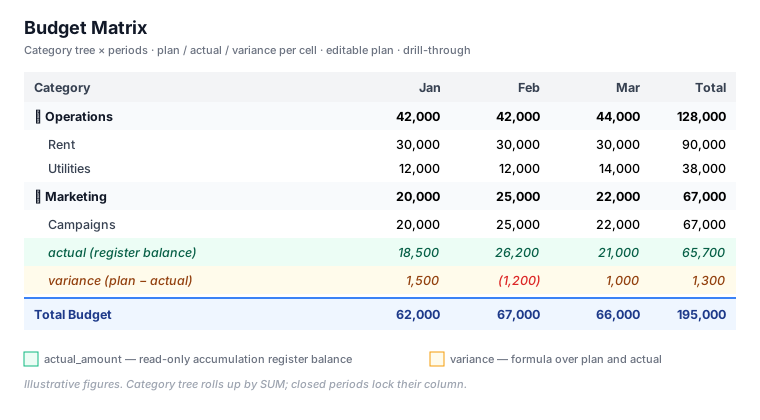
Features: category tree rows · period columns · editable plan · read-only actual · variance per cell · locked columns for closed periods · drill-through from any cell to its source line.
The matrix is pure view config — a
rowAxis(category dataset), acolAxis(period dataset, withlockedField: "closed"), and acellblock keyed oncategory_id×period_key. See ui/data_views.json.
Data model
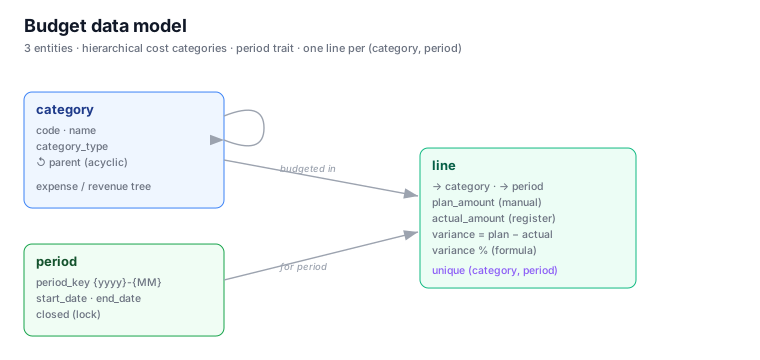
| Entity | Purpose | Key fields |
|---|---|---|
| category | Hierarchical cost / revenue categories | code, name, category_type, ↺ parent (acyclic) |
| period | Budgeting periods (period trait) | period_key {yyyy}-{MM}, description, start_date, end_date, closed |
| line | One budget line per (category, period) | → category, → period, plan_amount, actual_amount (register), variance, variance % |
| Relationship (child FK → parent PK) | Required |
|---|---|
| line.category_id → category.category_id | required |
| line.period_key → period.period_key | required |
| category.parent_id → category.category_id | optional |
Views
- Master data: Categories (tree-grid), Periods (grid)
- Lines: Budget Lines (grid — plan, actual, variance, variance %)
- Matrix: Budget Matrix (categories × periods)
Roles
- budget.admin — sets up categories and periods, full control of all three entities.
- budget.planner — reads categories/periods, creates and edits budget lines.
- budget.viewer — read-only across the budget and variance (e.g. CEO).
Actuals
There are no actions — actuals flow in from an "A" producer that posts movements into
line.actual_amount, keyed on the line. The reference producer is the separate budget-sample
module, which posts by line_id with autoCreateBalance: false so actuals land only on
already-planned lines.